Web Interface Setup (API & WebSocket)
If you want to integrate FahemAI's intelligence directly into your own custom website, mobile app, or internal dashboard, you can use our robust Web API or real-time WebSocket interface.
Configuration Guide
Follow these steps to enable and configure the Web API for your bot:
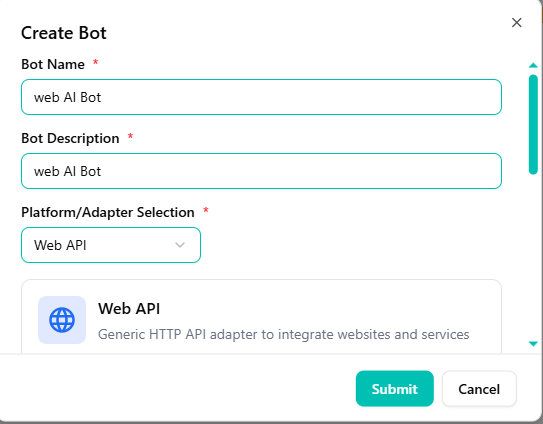
Select Web API Adapter
- Go to your FahemAI dashboard and select your bot.
- Navigate to the Bots section in the sidebar.
- Click the + (Plus) button and select Web API from the dropdown menu.
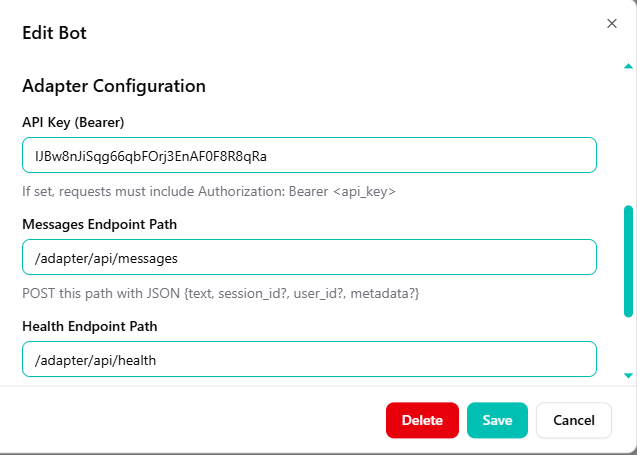
Configure API Settings
- Set an API Key (Bearer) for authentication.
- Define your Messages and Health endpoint paths.
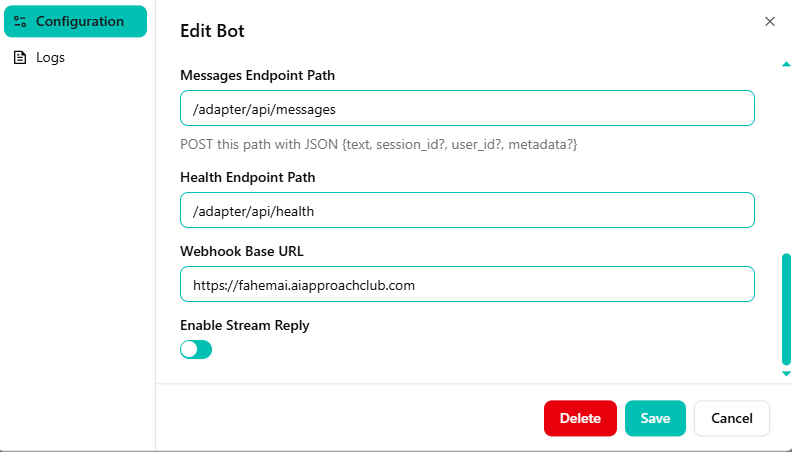
Set Webhook and Streaming
- Enter your Webhook Base URL.
- Enable Stream Reply if you want real-time text delivery.
- Click Save to apply changes.
Integration Details
- Web API (REST)
- Real-time Streaming
Traditional HTTP Integration
The Web API is perfect for standard messaging where you send a message and wait for a complete response.
Endpoint Details:
- Method:
POST - Path:
{YOUR_MESSAGES_PATH}(e.g.,/adapter/api/messages)
Required Payload:
{
  "text": "Hello, how can you help me?",
  "user_id": "user_unique_id",
  "session_id": "optional_session_id"
}
Live Updates
By enabling Stream Reply, your server will receive the AI response in chunks, allowing for a "typing" effect on your frontend.
Why use individual interfaces?
Full UI Control
Design the chat interface to match your brand exactly.
App Integration
Embed the AI directly into your iOS or Android applications.
Custom Logic
Add custom processing before or after the AI response.
Ensure your server URL is correctly configured and that you handle authentication securely if you are proxying requests.